One number from quote to payment
Quote, report, invoice and installments are the same case. The amount billed is the report’s — the same as in the PDF.
CORTEX · FINANCE BETA
Whoever runs the money no longer copies the report into the installments spreadsheet or checks, every day, who is due to pay. The same case the technician handled becomes money collected: the approved quote goes to the technician’s calendar, the closed report goes to “to invoice” and each installment has its due date on the calendar. At month end, the closing is ready for your accountant.

The essentials
Quote, report, invoice and installments are the same case. The amount billed is the report’s — the same as in the PDF.
What has been delivered but has no invoice yet, and for how many days.
CORTEX matches the statement with what you were owed and suggests a match for what is left, with the reason. Nothing is marked without you.
The job is done, the invoice goes out days later and payment comes in installments. Today, whoever runs the money keeps this in four places and copies number, client and amount by hand from one to the next.
BEFORE
WITH CORTEX
Invoicing system
Keep your invoicing system. CORTEX stores the invoice number and date
Service report system
Report, invoice and installments are one case, with one number
Spreadsheet of installments, income and expenses
Installments calculated from the report amount and already on the calendar
Bank: log in every day and look for who paid
Upload the statement: CORTEX matches it and you confirm
It is not just one system less. The retyping from one system to another disappears: less time, no copy errors, and you know earlier who has to pay.
01 · TO INVOICE
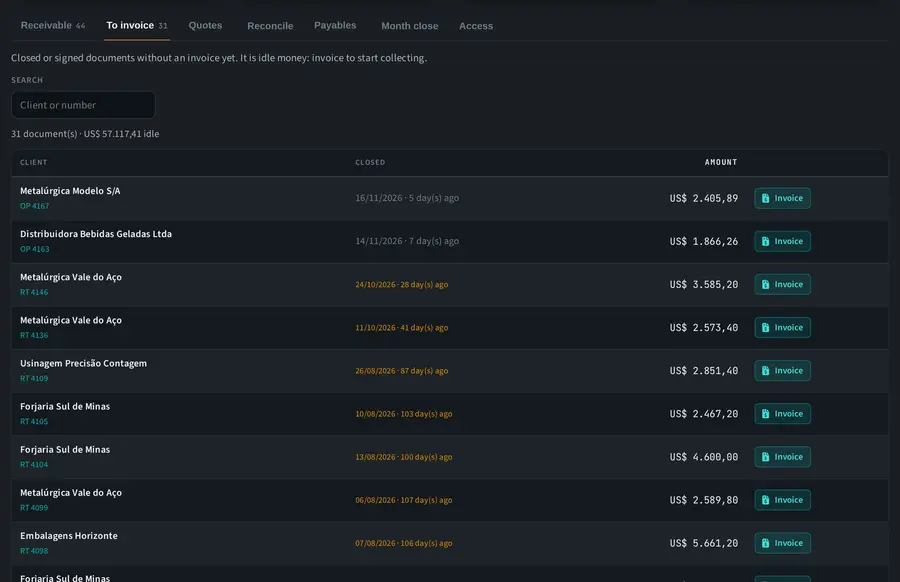
Every report closed or signed without an invoice goes to “to invoice”, with the amount and the days it has been waiting. Invoicing means noting the invoice and setting up the installments — the sum always matches the total.
02 · QUOTE
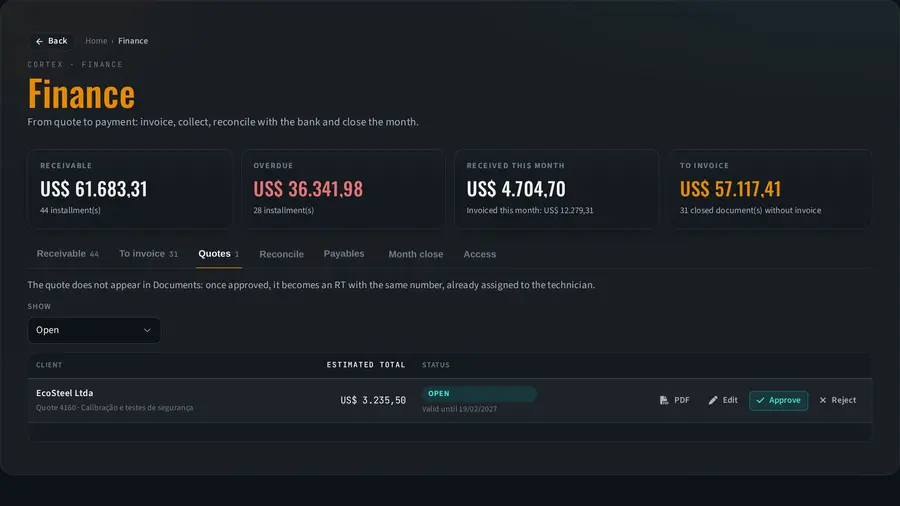
The quote goes out as a PDF with your logo. Once approved, it becomes the report with the same number, date and address, and the technician is notified.
03 · CALENDAR
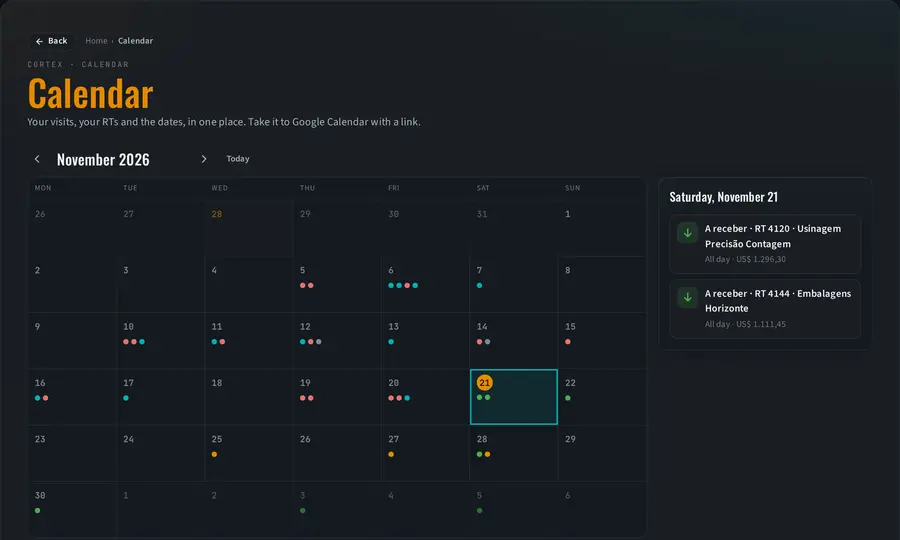
The technician’s visit, the installment coming in, the rent that is due and the quote that expires on Thursday. It all shows up by itself in the Calendar — and, with one link, in the calendar on your phone.
04 · RECONCILIATION
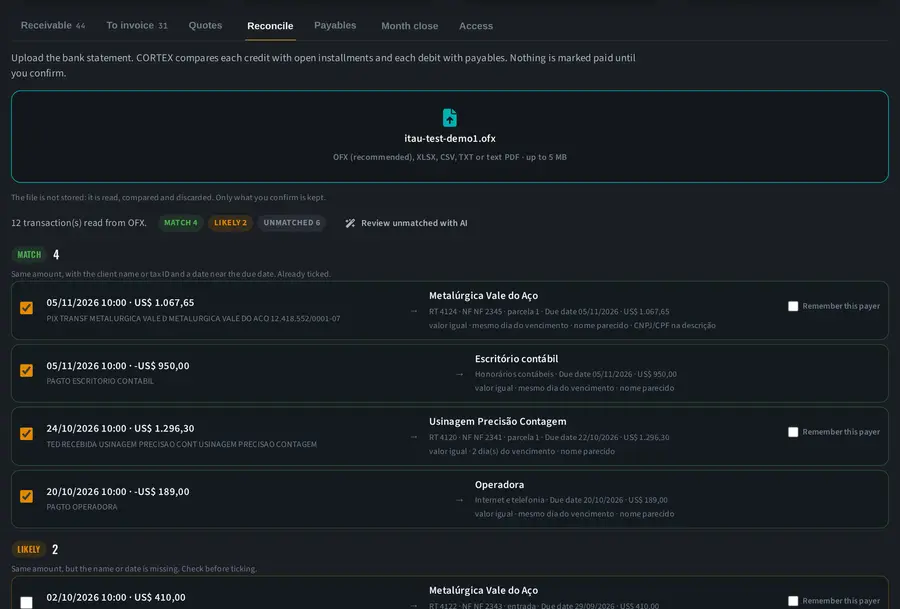
Upload the bank statement as OFX, spreadsheet, CSV, TXT or text PDF. CORTEX compares amount, name or tax ID and date with the open installments and shows what matches for sure. For what is left, it only suggests a match, with the reason.
05 · INDICATORS
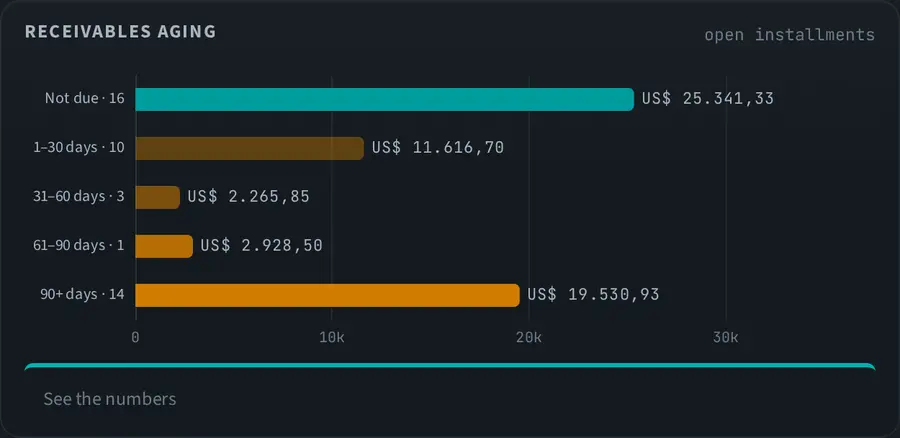
Billed and received over 12 months, a cash forecast for the coming weeks, the age of what you are owed, unbilled work and who pays on time. Each chart also shows the table with the numbers.
The quote goes out as a PDF and, once approved, becomes a job with the same number.
The technician writes the report; the amount is calculated in the report itself.
Note the invoice and set up the installments. Each due date goes into the Calendar.
Upload the statement, confirm the payments and close the month for your accountant.
All connected
Want to go deeper?
No. Your country's electronic invoices stay in the system you already use. CORTEX stores the invoice number and date, organizes what you are owed and checks what reached the bank.
No. Installments are built on the report, with its amount, and each due date goes to the calendar. Outside CORTEX you keep only your invoicing system.
Yes. You upload the statement in the format your bank offers (OFX, spreadsheet, CSV, TXT or text PDF). CORTEX does not connect to your account: it only reads the file you upload.
No. CORTEX matches the statement with clear rules and, for what is left, only suggests a match. A person always confirms, and everything is logged.
The company owner sees everything. An administrator only sees Finance if the owner allows it. Technicians never see amounts or due dates.
Not yet. CORTEX records how the customer paid: transfer, card or your country's payment methods.
Try it for 15 days or talk to us on WhatsApp.
Trial with a valid card. Cancel before day 15 and you pay nothing.
We use cookies to keep the site working and improving, and we share statistics with Meta to offer more competitive prices. We never sell your data.
We use cookies to keep the site working and improving. We never sell your data.